



Buying a smartphone is a major investment, and it’s easy to overlook flaws in the excitement of getting a new device. To avoid frustration—like discovering a dim screen, poor battery life, or a weak camera later—it’s wise to run a few quick tests in the store. This isn’t about being technical; it’s about making sure the phone meets your everyday needs. Below is a simple checklist to help you evaluate a phone before you buy it.
The Ultimate Pre-Purchase Physical Inspection
Scrutinize the Screen: Dead Pixels, Brightness, and Touch
Your phone’s display is your window to everything, so taking a moment to inspect it carefully is time well spent. Start by opening a plain white image or a blank web page to help you spot any dead or stuck pixels, which will appear as tiny dark or permanently colored dots on the screen. Next, slide the brightness control to its maximum level to assess how vibrant and clear the screen looks under the bright store lights, which is a good indicator of its outdoor visibility. Be sure to test the touch responsiveness by quickly swiping through menus, typing on the keyboard, and pinching to zoom on a photo to ensure there are no unresponsive areas.
The Folding Phone Factor: Testing the Hinge and Crease
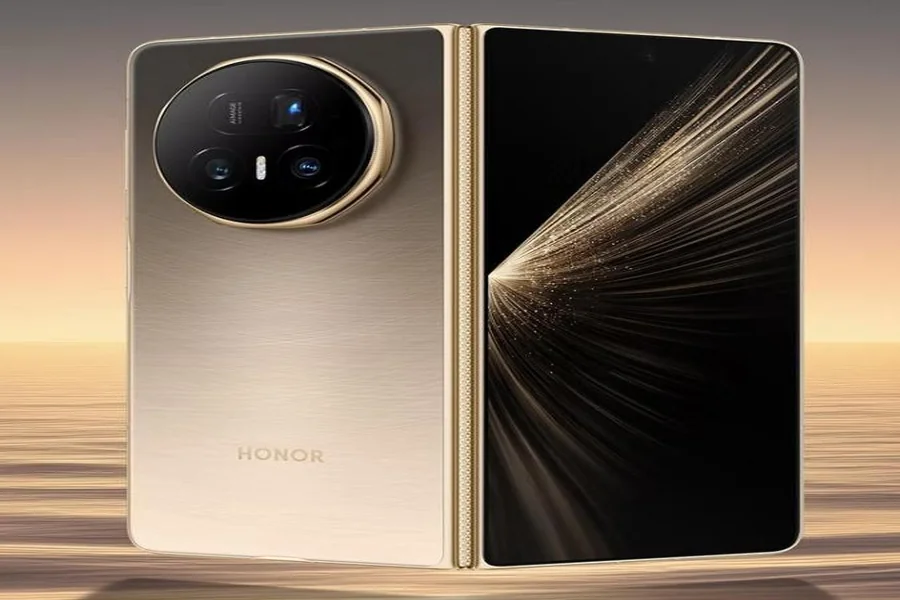
If you are considering a folding phone, the hinge mechanism and the visible crease on the inner screen demand special attention during your inspection. Open and close the device multiple times, paying close attention to the smoothness and consistency of the motion, ensuring it feels solid and doesn’t produce any concerning creaks or grinding noises. Carefully examine the crease on the flexible display; while a slight visibility is normal, run your finger across it to feel its prominence and check how it looks from different angles under various lighting. For a device that masters this innovative form factor, consider the HONOR Magic V5, which exemplifies the art of the fold at 8.8mm. At only 217g light, it redefines what a foldable can feel like, offering a remarkably solid and sleek experience. This hands-on test is vital to ensure you are comfortable with the unique aspects of a folding phone’s design.
Benchmarking Performance and Battery Life
While you cannot run extensive hour-long tests in a store, you can get a very good feel for a phone’s performance and battery potential. Open a few demanding applications, like a graphics-heavy game or a video streaming service, and switch quickly between them to see if the phone feels fast and responsive or if it stutters and lags. Check the phone’s settings menu to see if you can find its battery health or remaining charge percentage, which can give you a rough idea of how well it might hold a charge after a full cycle. Ask the store representative about the advertised battery life and consider how it aligns with your daily usage patterns, whether you are a heavy video streamer or a more casual user.
Putting the Camera System to the Test
Compare Photo and Video Quality in Various Lights
The camera is a key feature, so don’t assume it performs well in all conditions. While in the store, take photos in both bright and dimly lit areas to test low-light performance and detail retention. Also, record a short video while panning slowly to check for smoothness, autofocus accuracy, and stability. Finally, review your samples on the phone’s screen to evaluate color, sharpness, and overall clarity right away.
Test All Lenses: Ultra-Wide, Zoom, and Selfie
Most modern phones come with a suite of cameras, and you should make a point to test every single one of them before you buy. Switch to the ultra-wide-angle lens and take a picture to see how much more you can fit into the frame without distortion around the edges, which is perfect for group photos or landscapes. Try the zoom lens at different levels of magnification, checking if the image remains clear and detailed or becomes soft and blurry when you zoom in too far. Finally, switch to the front-facing selfie camera to ensure it captures a flattering and natural-looking image, perhaps even testing any portrait modes that blur the background.
Verifying Connectivity and Audio
Test Cellular Signal, Wi-Fi, Bluetooth, and GPS
A phone with poor connectivity is a constant source of frustration, so a quick connectivity check is a non-negotiable step. If possible, note the cellular signal strength bars in the store and compare it to another phone you own to see if it seems weaker or stronger on the same network. Connect to the store’s Wi-Fi and try loading a webpage or a video to ensure it acquires a signal and maintains a stable connection without dropping out. Turn on the Bluetooth and try pairing it with a demo accessory or your own wireless headphones to confirm the pairing process is quick and seamless. Finally, open a maps app to verify GPS accuracy and speed.
Check Speaker Output and Microphone Clarity
The quality of your calls and media playback depends entirely on the often-overlooked speakers and microphone. Play a music video or a movie trailer to test the external speakers, listening for clear sound, a lack of distortion at higher volumes, and whether it offers stereo separation. For the microphone, use the voice recorder app to capture a quick memo of you speaking in a normal tone and then play it back to hear if your voice is recorded clearly and without any muffled or tinny qualities.
Conclusion
Taking ten to fifteen minutes to run through this practical checklist can make a long-term satisfaction. You are no longer just relying on specifications and sales pitches but are making an informed decision based on your own hands-on experience. You have verified that the display is flawless, the performance is snappy, the camera takes excellent photos, and all the connections work as they should. By testing before you buy, you ensure that the device you choose will reliably support your daily life, from work to entertainment. Walk out of the store with the confidence that your new phone is a perfect fit for you.
