



Firmware serves as the essential software layer embedded directly into your router, enabling it to control and manage all its functions. With router firmware, your device can operate effectively, handle multiple connections, and secure your network from various external threats. Firmware is the backbone of your router, orchestrating its operations and ensuring that data flows smoothly. For optimal performance and security, staying current with firmware updates is crucial. As routers become more advanced, their firmware plays an increasingly vital role in managing complex network functions, preventing malware, and optimizing speeds. While updating firmware may seem like a minor task, it has significant implications for your network’s security, connectivity, and overall reliability.
Key Reasons to Keep Router Firmware Updated
Regularly updating your router’s firmware offers several advantages that can significantly enhance both security and functionality. Firstly, firmware updates often include critical security patches designed to guard against new threats. Hackers constantly look for vulnerabilities in routers, and updates help plug these security gaps, ensuring your network stays protected. Second, firmware updates can bring performance improvements. By installing the latest firmware, you may notice faster speeds, better stability, and reduced instances of lag or disconnection. In some cases, updates can even optimize bandwidth, enabling smoother streaming and gaming experiences. Finally, firmware updates sometimes add support for new technologies or device compatibility, making your network more versatile and future-proof.
How to Check for and Apply Firmware Updates
Accessing the Huawei WiFi Router Login for Updates
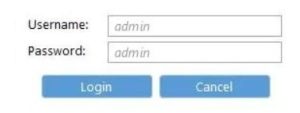
To manually update your Huawei router’s firmware, you first need to access the router’s management panel, which is typically done through a default IP address like 192.168.8.1. Begin by ensuring that your device, whether a computer or smartphone, is connected to the router’s WiFi network. Open a web browser and type the IP address (192.168.8.1) into the address bar—make sure to enter this directly in the URL bar, not in a search engine. Once the huawei wifi router login page appears, enter your administrator username and password. For many Huawei routers, the default credentials are often “admin” for both fields, but you may need to check the router label for specific login details. Once logged in, navigate to the firmware or system update section. Here, you’ll find options to check for and install any available updates. After updating, your router may automatically restart, applying the latest security and performance enhancements.
Using Huawei’s Mobile App to Enable Automatic Updates
If you prefer a hands-off approach, Huawei’s mobile app provides a convenient way to manage firmware updates. Download the Huawei AI Life app, available for both Android and iOS. Open the app and connect it to your Huawei router by following the on-screen instructions. Once connected, access the router settings and look for the “Firmware Update” option, which typically appears under advanced settings. Enable the “Auto-Update” feature within this section. This option allows the app to check for and apply updates automatically, keeping your firmware current without any manual intervention. This setting is particularly useful for maintaining security, as it ensures you receive critical updates as soon as they’re released.
Common Issues Addressed by Firmware Updates
Fixing Connectivity Drops and Latency Issues
Firmware updates can resolve many connectivity issues commonly experienced with routers, such as sudden drops in WiFi connection or increased latency during online activities. These problems are often caused by bugs in the software that impact performance. A firmware update typically includes patches for these issues, ensuring more stable and reliable connectivity. In cases where your network experiences frequent slowdowns or random disconnections, updating the firmware could be the solution. Many manufacturers, including Huawei, continuously improve the router’s ability to handle multiple devices simultaneously, which is essential for smart homes with several connected devices.
Adding Support for New Devices and Standards
With the increasing variety of smart devices on the market, router compatibility is essential. Firmware updates frequently include support for new device types and wireless standards, allowing your router to seamlessly connect with the latest technologies. For example, as WiFi 6 becomes more widespread, firmware updates enable older routers to support WiFi 6-enabled devices, improving connectivity speeds and efficiency. Updating your router’s firmware ensures it remains compatible with new devices, from smart thermostats and home assistants to the latest smartphones. Without these updates, you may encounter connectivity issues with newer devices, limiting the functionality of your smart home ecosystem.
Best Practices for Firmware Update Management
Scheduling Regular Checks for Firmware Updates
While many modern routers allow for automatic updates, it’s still a good idea to manually check for firmware updates periodically. Scheduling monthly or quarterly checks can help ensure that your router’s firmware is always up to date. You can set a reminder to log into the router’s web interface or use Huawei’s AI Life app to manually verify that you have the latest firmware installed. Regular checks are especially important if you experience any persistent connectivity issues. By routinely checking for updates, you reduce the risk of security vulnerabilities and ensure your network consistently performs at its best. Remember, an updated router contributes to a more secure, faster, and more reliable internet experience.
Backing Up Settings Before Updating
Before applying a firmware update, it’s wise to back up your current router settings, particularly if you have customized configurations. Backing up settings ensures that if something goes wrong during the update, you can easily restore your previous configurations. Many routers offer a “Backup” option in the settings menu, allowing you to save a copy of your configurations. Once the firmware update completes, you can reload the backup file if needed, minimizing the downtime and hassle of reconfiguring the router. Regular backups before updates help avoid potential frustrations and keep your network running smoothly.
Conclusion
Updating router firmware might not be the most exciting task, but it’s essential for maintaining a secure and efficient network. Regular updates ensure that your router has the latest defenses against security threats and provides the best possible performance. By checking for updates manually or enabling automatic updates through the Huawei AI Life app, you can keep your router operating at its peak. With up-to-date firmware, your network stays protected, reliable, and ready to meet the demands of your connected devices.
