



In today’s competitive job market, having a polished resume isn’t enough. With applicant tracking systems (ATS) filtering out a significant number of applications before they ever reach a human recruiter, job seekers must optimize their resumes to pass through digital gatekeepers. That’s where Jobscan comes in—a powerful resume optimization tool that helps candidates tailor their resumes to specific job descriptions and dramatically improve their chances of getting noticed.
This article explores everything you need to know about Jobscan: what it is, how it works, its key features, pricing, pros and cons, and how it compares to other tools in the job search ecosystem.
What Is Jobscan?
Jobscan is an online platform designed to help job seekers optimize their resumes and LinkedIn profiles. It analyzes your resume against a specific job description and provides a detailed match report, highlighting where your resume falls short and offering suggestions to improve keyword alignment, formatting, and relevance.
Founded in 2013, Jobscan was built out of frustration with traditional job applications and the often-overlooked importance of ATS compatibility. Since then, it has become one of the most trusted resources for job seekers aiming to beat the ATS and land more interviews.
How Does Jobscan Work?
The process is straightforward:
-
Upload Your Resume
Start by uploading your existing resume into the Jobscan interface. -
Paste the Job Description
Next, copy and paste the job description of the role you’re applying for. -
Analyze
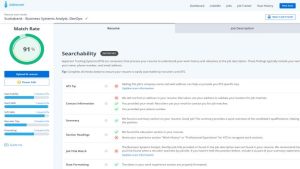
Jobscan compares the two and generates a match rate score (out of 100%) along with specific suggestions for improving your resume. -
Edit and Improve
You can adjust your resume based on the feedback, including:
-
Adding missing keywords
-
Rephrasing skills
-
Adjusting job titles
-
Formatting tweaks
-
Repeat the Scan
Jobscan allows you to scan and rescan your resume to continually refine it until you reach your target match score.
Key Features of Jobscan
Resume Match Rate
Jobscan provides a percentage score showing how well your resume matches the job description. A score above 80% is generally considered competitive.
Keyword Optimization
It identifies essential hard skills, soft skills, and other keywords that appear in the job description but are missing from your resume.
ATS Formatting Tips
The platform checks for resume formatting issues that could confuse applicant tracking systems—such as columns, graphics, or unusual fonts.
Jobscan Resume Templates
Jobscan offers ATS-friendly templates that are structured to pass automated screening and highlight the most relevant information.
LinkedIn Optimization
Jobscan also analyzes your LinkedIn profile and provides tips for improving visibility and recruiter interest based on the jobs you’re targeting.
Cover Letter Optimization
With the premium plan, you can analyze your cover letters just like resumes, ensuring they align with the job description and enhance your overall application.
Job Tracker Tool
A built-in application tracker lets you manage your job applications, follow up, and stay organized throughout your job search.
Who Should Use Jobscan?
Jobscan is ideal for:
-
Recent graduates seeking their first job
-
Mid-career professionals looking to change industries
-
Executives targeting high-level roles
-
Freelancers or gig workers transitioning to full-time employment
-
International job seekers unfamiliar with U.S. hiring systems
-
Anyone applying online where ATS filtering is common
Benefits of Using Jobscan
Increases Your Interview Chances
By tailoring your resume to each job, you’re more likely to pass ATS screening and make it to the interview stage.
Saves Time
Instead of guessing which keywords to use, Jobscan gives you actionable, data-driven advice that streamlines the editing process.
Boosts Confidence
With a concrete match score and specific recommendations, you can apply with more confidence that your resume will resonate with recruiters.
Improves Your LinkedIn Profile
Jobscan helps optimize your online presence, which is crucial since many recruiters search for candidates via LinkedIn.
Pricing Plans
Jobscan offers both free and paid plans:
Free Plan
-
5 resume scans per month
-
Limited keyword suggestions
-
Access to the LinkedIn optimization tool
Premium Plan (Starts at $49.95/month)
-
Unlimited resume and job description scans
-
Cover letter analysis
-
Advanced resume management tools
-
Priority customer support
-
Monthly and semi-annual billing options available
Tip: They often offer discounts or trial periods, especially for students and veterans.
Jobscan vs. Other Resume Tools
| Feature | Jobscan | Zety | Resume.io | Resumatch.io |
|---|---|---|---|---|
| Resume-Job Match Analysis | Yes | No | No | Yes |
| ATS Optimization | Yes | Partial | No | Yes |
| LinkedIn Scan | Yes | No | No | No |
| Cover Letter Analysis | Yes (premium) | Yes | Yes | No |
| Templates | ATS-Friendly | Design-Heavy | Design-Heavy | Basic |
| Free Plan | Yes (limited) | Yes (limited) | Yes | Yes |
-
Applying to Multiple Jobs
Use Jobscan to create multiple versions of your resume, each tailored to a different job. -
Targeting a Career Change
When switching industries, Jobscan helps you incorporate the right keywords from your new field. -
Updating Your LinkedIn Profile
Increase your visibility to recruiters by optimizing your LinkedIn summary and experience sections. -
Preparing for Interviews
Use keyword insights from Jobscan to anticipate what skills and experience you’ll be asked about during interviews.
Tips for Getting the Most Out of Jobscan
-
Aim for an 80–90% match score for each job.
-
Use Jobscan’s resume templates if starting from scratch.
-
Avoid keyword stuffing—ensure your edits still make sense contextually.
-
Use the tracker tool to monitor your applications and set reminders.
-
Regularly update your LinkedIn based on Jobscan suggestions.
Is Jobscan Worth It?
If you’re applying for jobs online and not hearing back, Jobscan is definitely worth a try. The free plan offers basic functionality, but the premium version truly shines for those conducting an intensive job search or applying to high-competition roles. The data-backed feedback can be the difference between a resume that’s ignored and one that gets shortlisted.
Final Thoughts
In the world of digital hiring, understanding how applicant tracking systems work is crucial. Jobscan gives job seekers a major advantage by demystifying the hiring process and offering tools to beat the bots.
With resume scanning, keyword matching, and optimization tips, Jobscan empowers you to take control of your job search and stand out in a crowded field. Whether you’re just starting out or reinventing your career, this tool helps ensure your resume doesn’t just pass the first test—it excels at it.
FAQ: Jobscan – The Ultimate Tool for Optimizing Your Resume and Landing More Interviews
Q1. What is Jobscan?
Jobscan is an online tool that compares your resume to a job description and provides a match rate along with suggestions to optimize it for applicant tracking systems (ATS).
Q2. How does Jobscan help with job applications?
By identifying important keywords and formatting adjustments, Jobscan improves your resume’s chances of passing ATS filters and being seen by recruiters.
Q3. What is a good match rate on Jobscan?
A match rate of 80% or higher is typically recommended for maximizing interview opportunities.
Q4. Can Jobscan help with cover letters?
Yes, with a premium subscription, Jobscan can analyze and optimize your cover letter for alignment with job descriptions.
Q5. Is Jobscan free to use?
Jobscan offers a limited free plan with up to 5 scans per month. For full features and unlimited scans, a premium plan is required.
Q6. Does Jobscan work with LinkedIn profiles?
Yes, Jobscan offers LinkedIn optimization tools to help improve your profile visibility and attractiveness to recruiters.
Q7. Is Jobscan suitable for career changers?
Absolutely. Jobscan helps career changers align their transferable skills with new job descriptions, increasing their chances of being considered.
Q8. Does Jobscan provide resume templates?
Yes, Jobscan offers ATS-friendly resume templates to ensure proper formatting and readability by automated systems.
Q9. Can I use Jobscan for multiple job applications?
Yes, especially with a premium subscription, Jobscan is ideal for tailoring your resume to multiple job postings efficiently.
Q10. How accurate is Jobscan?
Jobscan’s technology is based on how ATS software parses resumes and job descriptions, making it a highly effective and data-driven tool.
